
Written by : Lucas Mason
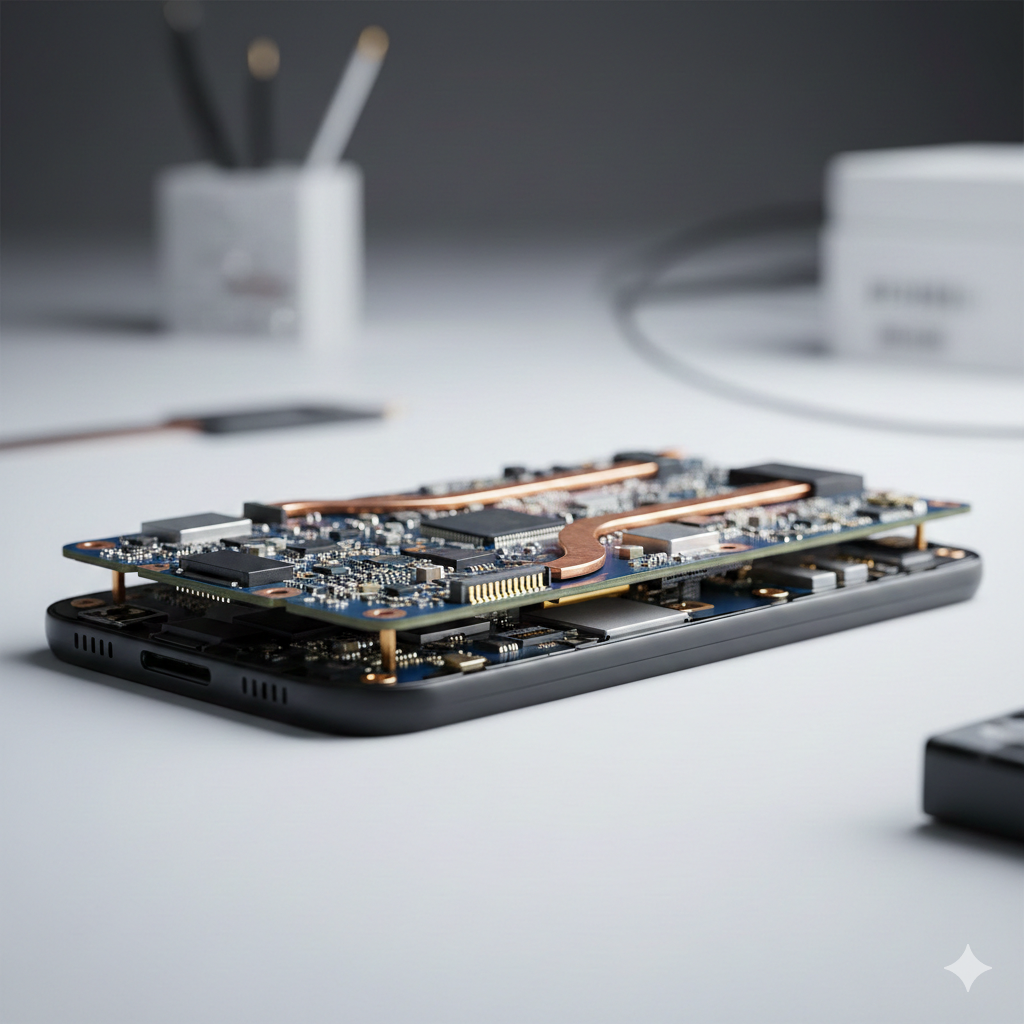
If you’ve recently noticed your high-end smartphone lagging, losing Wi-Fi connectivity, or suddenly refusing to touch-respond, you aren’t alone. As we push into 2026, the gap between software ambition and hardware limits is narrowing dangerously. We are seeing a significant uptick in “sandwich board” failures—a sophisticated hardware issue where the two-layered logic boards in modern devices literally begin to pull apart. Having spent years diagnosing micro-soldering issues, I’ve seen firsthand how the heat generated by next-gen, resource-heavy applications acts as a catalyst for this physical degradation. Understanding this phenomenon is vital for anyone looking to protect their investment in premium mobile technology.
Section 1: Understanding the Sandwich Board Architecture
Modern flagships utilize a “stacked” or “sandwich” motherboard design to save space for larger batteries and advanced camera modules. This involves two separate PCB (Printed Circuit Board) layers joined together by a middle frame and hundreds of tiny solder balls. While this engineering feat allows for incredibly slim devices, it introduces a structural vulnerability.
When you run high-performance 2026 apps—particularly those leveraging intensive AR rendering or local AI processing—the processor generates localized heat that reaches record highs. Because these two boards are bonded together, the thermal expansion must be perfectly uniform. If the heat isn’t dissipated quickly enough, the solder joints between the layers can crack or “interposer” pads can lift. This results in what we call motherboard separation in modern flagships, leading to a total communication breakdown between the phone’s vital components.
Section 2: Why 2026 Apps are the Tipping Point
The software landscape has shifted. We are no longer just dealing with social media scrolling; we are dealing with sustained, high-wattage workloads.
Thermal Cycling and Solder Fatigue Every time you launch a heavy application, your device undergoes a rapid thermal cycle. The CPU heats up, the metal and solder expand, and then they contract as the device cools. In earlier models, this was manageable. However, the complexity of 2026 software means these cycles are more frequent and more intense. Over months of use, this “respiratory” action of the hardware leads to solder fatigue.
Common Symptoms of Separation:
- Intermittent Greyed-out Wi-Fi: Often the first sign that the top board is losing contact with the communications chip on the bottom board.
- No Baseband/No Service: A classic symptom of the sandwich layers splitting near the cellular modem area.
- Touch Disease or Audio Issues: When the layers responsible for peripheral ICs (Integrated Circuits) begin to drift.
If you are experiencing these glitches, it is often more than a software bug. Before the issue becomes permanent, many users choose to track a repair to see if a professional re-balling of the board is necessary.
Section 3: Protecting Your Device and Professional Solutions
Preventing motherboard separation requires a mix of mindful usage and knowing when to seek expert intervention. Since this is a hardware-level failure, software “cooling apps” rarely provide a real solution.
Practical Advice for High-End Users:
- Manage Ambient Temperature: Avoid using high-performance apps while your phone is charging or in direct sunlight. The cumulative heat is the primary enemy of solder integrity.
- Use Performance Modes Wisely: If your OS allows, use “balanced” power settings rather than “ultra” for daily tasks to reduce the thermal load on the logic board.
- Recognize the Signs Early: If your phone feels uncomfortably hot to the touch during routine tasks, the internal thermal paste or pads may be degrading.
When a split occurs, it requires micro-soldering expertise to “split and re-ball” the boards. This isn’t a DIY project. If your device is already showing signs of failure, you should repair a device through a certified technician who understands the nuances of multi-layer PCB geometry. In cases where the damage is too extensive, some users find it more cost-effective to sell a device for parts and upgrade to a model with better thermal management.
Section 4: Conclusion and Final Thoughts
The trend toward more powerful, AI-driven applications isn’t slowing down, and neither is the physical strain on our hardware. Motherboard separation in modern flagships is a reminder that even the most expensive technology has physical limits. By understanding the relationship between thermal stress and sandwich board architecture, you can take proactive steps to extend the life of your smartphone.
If you’re unsure about the health of your current flagship, getting an instant quote for a diagnostic checkup can save you from a complete device blackout. Staying informed and acting at the first sign of hardware instability is the best way to ensure your tech keeps up with the demands of 2026 and beyond.
FAQs
Can a software update fix motherboard separation?
No. While an update can throttle the CPU to produce less heat, it cannot physically reconnect solder joints that have already cracked or separated. This is a physical hardware failure.
Is this issue covered under standard warranties?
Usually, yes, if there is no evidence of drop damage or liquid ingress. However, manufacturers often replace the entire unit rather than repairing the board, which can lead to data loss.
How do I know if my phone uses a sandwich board design?
Most flagship devices released by major manufacturers from 2020 onwards (including the latest 2025 and 2026 models) utilize stacked PCB architecture to maximize internal space.
Disclaimer: This information is for educational purposes regarding mobile hardware architecture. If your device is overheating or malfunctioning, we recommend consulting a professional technician at a reputable location to avoid further internal damage. Handling internal components without proper ESD (Electrostatic Discharge) protection can permanently bridge connections on the logic board.
 French
  English