
Written by Lucas Mason
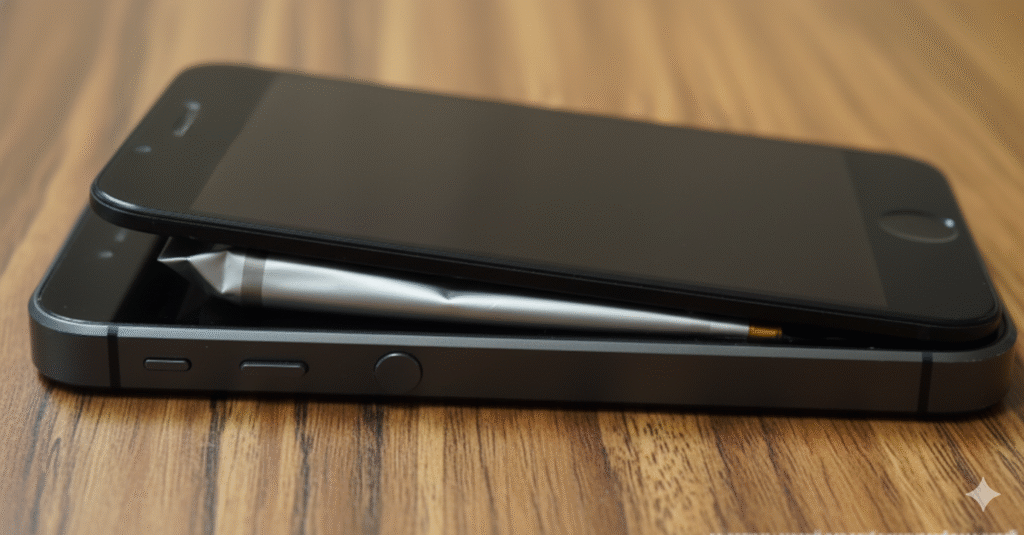
You pick up your smartphone or open your laptop, and something feels… wrong. The glass display isn’t flush with the frame anymore. There is a strange gap, or perhaps the trackpad on your laptop has become impossible to click. You might be tempted to simply push it back down.
Stop. Do not press down on that screen.
That “lift” is rarely a result of bad glue or a loose screw. In the vast majority of cases, it is the physical manifestation of a chemical reaction gone wrong inside your device: a swollen lithium-ion battery.
As experts at Reparation Tech, we see this issue daily. While it looks like a cosmetic annoyance, it is actually a significant safety hazard. This falls under the category of YMYL (Your Money, Your Life) because ignoring it can lead to property damage, toxic fume exposure, or even fire.
In this guide, we will break down exactly why batteries swell, the chemistry behind the danger, and the immediate steps you must take to secure your safety and your data.
Section 1: The Anatomy of the “Lift” (What is Happening Inside?)
When a screen lifts, it is usually because the component underneath it—the battery—has physically expanded. But why does a solid object suddenly puff up like a balloon?
The Chemistry of Outgassing
Modern devices use Lithium-Ion (Li-ion) batteries. These are incredibly efficient, but they rely on a precise chemical balance. A Li-ion battery consists of a cathode, an anode, and a liquid electrolyte solution.
When a battery is damaged, overcharged, or simply too old, the electrolyte breaks down. This decomposition process generates gas (mostly carbon dioxide (CO2), carbon monoxide (CO), and hydrogen). Since batteries are sealed in airtight casings to prevent moisture from entering, this gas has nowhere to go. The result? The casing expands.
Because smartphones and modern laptops are designed with zero wasted space, even a millimeter of expansion creates immense internal pressure. The path of least resistance is usually the screen or the trackpad, causing them to pop out or “lift.”
Why It’s Not Just a “Glitch”
Many users assume the screen is just peeling. However, confirmed by safety reports from organizations like the Occupational Safety and Health Administration (OSHA), a swollen battery is a compromised vessel containing flammable chemicals under pressure. It is a hardware failure, not a cosmetic glitch.
Section 2: Identifying the Symptoms (Beyond the Screen)
While a lifting screen is the most obvious sign, there are other indicators that your battery is failing before it reaches the critical “swelling” stage. If you notice these, you should visit our Repair Page immediately.
1. The “Squishy” Screen
On tablets and phones, if you press gently on the screen and it causes “puddling” or discoloration (like pressing on an old LCD calculator) even with light pressure, the battery may be pushing against the back of the display.
2. Unresponsive Trackpads
On laptops (especially MacBooks and Ultrabooks), the battery often sits directly under the trackpad. If your click mechanism stops working, or the cursor starts moving on its own, the battery is likely swelling upward.
3. The Sweet Smell of Danger
If you detect a faint, sweet, metallic, or acetone-like odor coming from your device, leave the room immediately. This indicates that the battery envelope has already ruptured and is leaking toxic gas. This is a critical emergency.
4. Excessive Heat
Does your phone get hot while charging? A failing battery struggles to accept a charge, converting that electrical energy into heat rather than stored power.
Section 3: The Dangers of Thermal Runaway
Why are we so adamant that you shouldn’t press the screen back down?
If you force a lifting screen back into place, you risk puncturing the pressurized battery casing. Puncturing a charged Li-ion battery causes a short circuit between the cathode and anode.
This leads to Thermal Runaway. Thermal runaway is a self-reinforcing cycle where the battery generates heat, which causes more chemical breakdown, which generates more heat. This can happen in milliseconds, leading to temperatures exceeding 1,000°F (538°C), causing the device to ignite or explode.
Expert Note: Never attempt to “prick” the battery to let the air out. This releases toxic, flammable gases and will almost certainly cause a fire.
Section 4: Immediate Safety Protocol (What To Do Right Now)
If your screen is lifting, follow these steps immediately. Do not wait.
- Stop Charging: Unplug the device immediately. Charging a swollen battery increases the pressure and heat.
- Power Down: Turn the device off completely. Do not put it in “Sleep” mode.
- Do Not Squeeze: We cannot stress this enough. Do not put the device in your pocket, and do not pile books on it to “flatten” it.
- Back Up Data (If Safe): If the device is still functional and not hot to the touch, quickly back up your essential photos and documents to the cloud. If the device is hot, skip this step. Your safety is worth more than your data.
- Place on a Non-Flammable Surface: If you cannot get to a repair shop immediately, place the device on a concrete floor, a stone tile, or inside a metal bucket, away from curtains, paper, or wood.
Professional Removal is Mandatory
Removing a swollen battery is dangerous. The adhesive strips used by manufacturers often require force to remove—force that can rupture a swollen cell. This requires professional tools and safety gear (sand buckets and fireproof gloves).
Please check our Location Page to find the nearest Reparation Tech expert to handle this safely for you.
Section 5: Repair vs. Replace – Making the Financial Decision
Once you’ve established you have a swollen battery, you have a choice: fix the device or move on.
Option A: Repair (Battery Replacement)
In most cases, replacing the battery is significantly cheaper than buying a new device.
- Pros: Cost-effective; retains your data and settings; environmentally friendly.
- Cons: If the swelling was severe, it may have permanently cracked the screen or bent the logic board.
- Verdict: If the device is less than 3-4 years old, a battery replacement is usually the best investment. Visit our About Us page to learn about our technicians’ qualifications in handling these repairs.
Option B: Replace (Buy/Sell)
If your device is older, or if the swelling damaged the motherboard, it might be time to upgrade.
- Sell the Old Device: Believe it or not, you can still sell a broken device for parts. We can help you with this via our Sell a Device program.
- Buy a Certified Pre-Owned Device: If you need a replacement fast, check out our inventory at Buy a Device.
Section 6: Prevention – Can You Stop It From Happening?
While all batteries degrade over time, you can prevent premature swelling:
- Avoid Extreme Temperatures: Don’t leave your phone in a hot car or in direct sunlight. Heat accelerates chemical degradation.
- Use Quality Chargers: Cheap, gas-station chargers often lack the safety chips that regulate voltage. This can overcharge the battery, leading to swelling.
- Don’t Leave It Plugged in 24/7: While modern devices are smart, keeping a laptop plugged in at 100% for months on end keeps the battery in a high-tension state. Discharge it to 20% occasionally.
Conclusion
A lifting screen is your device’s way of waving a red flag. It is not a cosmetic issue; it is a chemical time bomb. By recognizing the signs of a swollen battery early, you can prevent a fire hazard and save your expensive electronics from total destruction.
Don’t gamble with safety. If your screen is lifting, bring it to the professionals.
Need help today?
FAQs: Swollen Battery Safety
Q1: Can I still use my phone if the battery is slightly swollen? A1: No. Even slight swelling indicates the battery’s internal safety mechanisms have failed. Continued use creates heat, which increases pressure and the risk of fire. Turn it off and seek professional repair immediately.
Q2: Is a swollen battery hazardous waste? A2: Yes. You cannot throw a swollen battery in the regular trash or standard recycling bins. It creates a fire risk for sanitation workers. It must be disposed of at a specialized e-waste facility or a certified repair shop like Reparation Tech.
Q3: Will the screen go back down after I replace the battery? A3: Usually, yes. If the glass is not cracked and the frame is not permanently bent, removing the swollen battery releases the pressure, allowing the screen to sit flush again. However, in severe cases, the screen may need reseating or replacement.
Disclaimer
Important Safety Warning: The information provided in this blog post is for educational purposes only. A swollen battery is a serious fire hazard. Do not attempt to puncture, bend, or remove a swollen battery yourself unless you have the proper training and safety equipment. Reparation Tech is not liable for injuries or damages resulting from DIY repair attempts. Always consult a professional technician for hazardous battery handling.
 English
  French